Lovable Cloud to Supabase Migration Tool: Migrate in 3 Simple Steps
Our free Lovable Cloud to Supabase migration tool moves your database, users and files to your own Supabase project in minutes. Free. Secure. Your keys never leave your session. No coding knowledge needed.
How the Lovable Cloud to Supabase migration tool works
Three simple steps take you from a managed Lovable backend to a Supabase project you own.
- Step 1
Connect GitHub and Supabase
Sign in with the official OAuth screens. GitHub access is read-only and limited to the repository you choose, and Supabase access is used only to create your tables and import your data.
- Step 2
Upload your CSV exports
Lovable does not hand over everything automatically, so you export each table as a CSV and your auth users with one query. Drop the files into the page and we match every file to the right table.
- Step 3
Click Migrate
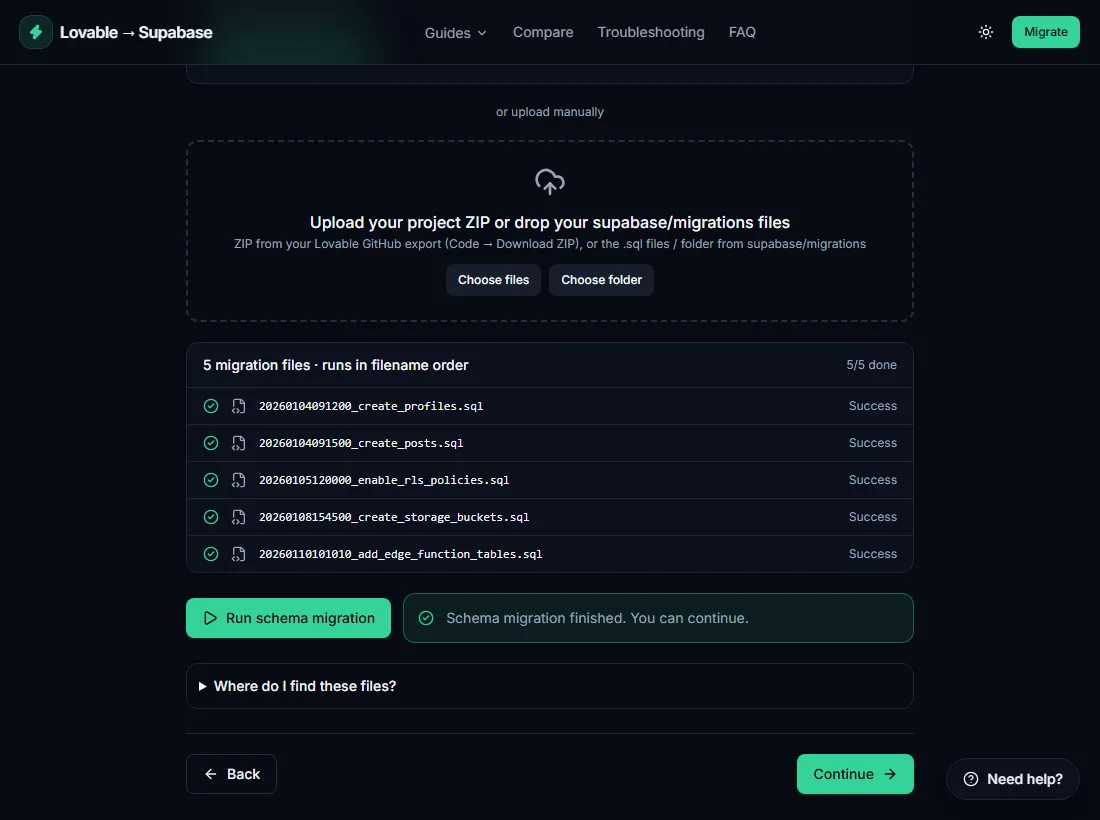
We replay your schema in order, import rows parents-first, copy users with their ids and password hashes, and upload your files. You watch live progress and download a report at the end.
Prefer to do it by hand? Follow our step-by-step Lovable Cloud to Supabase guide instead.
See the migration tool in action
What gets migrated
Everything your app needs to run on its own backend.
Schema and RLS policies
Tables, functions, triggers and Row Level Security policies are replayed from your migration files, in timestamp order.
Table data
Rows are inserted in batches of 500, sorted by foreign keys, with empty strings, JSON, arrays, booleans and timestamps converted per column type.
Auth users
Users keep their ids and bcrypt password hashes, with matching identities, so existing logins keep working.
Storage files
Buckets are recreated with the same public or private setting and files keep their folder paths.
Edge functions (guided)
We list your functions and secret names and give you the exact Supabase CLI commands to deploy them.
Why move from Lovable Cloud to your own Supabase project?
Lovable Cloud is a quick way to get a backend running. As soon as an app has real users, though, many builders want more control. A Lovable to Supabase migration does not change how your app works, because Lovable Cloud and Supabase use the same Postgres foundation. It changes who is in charge. Whether you call it a Lovable migration, moving off Lovable Cloud or wanting to self-host a Lovable app, the goal is the same. Here is what people usually want from the move.
Ownership
Your database, users and files live in a Supabase project under your account, with your billing and your access rules. Nobody else decides when features, limits or pricing change.
Scaling
Pick the region and compute size you need and upgrade when traffic grows. You can add read replicas, backups and monitoring without waiting for a platform to expose them.
Direct database access
Use the full Supabase dashboard: SQL editor, table editor, logs and connection strings for BI tools, scripts and other apps that need to read your data.
Lower, predictable costs
Supabase publishes its pricing, so you can see what a given amount of storage and compute costs and choose the plan that fits instead of guessing.
Wondering what it costs? See our Lovable Cloud pricing guide. Not sure yet? Read our honest comparison of Lovable Cloud and Supabase.
We never store your passwords or keys
A migration tool needs real access to your project, so it has to earn your trust. The migrator is built so that it cannot keep what it does not need. Everything is explained on our privacy page.
Official OAuth login
You approve access on Supabase's and GitHub's own sign-in screens. You never paste a password.
Read-only GitHub access
The GitHub app only reads files from the repository you select. It cannot change your code.
Nothing stored
Tokens and keys live in memory for the length of a request. They are never written to a database or to logs, and you can revoke access any time.
Manual migration vs the migrator tool
You can absolutely migrate by hand, and our guides show you how. The tool simply removes the repetitive and error-prone parts.
| Manual migration | Migrator tool | |
|---|---|---|
| Time needed | Hours of copying files and fixing errors | Roughly 20 to 40 minutes |
| Migration order | You work out foreign key order yourself | Tables sorted automatically, parents first |
| Type conversion | Manual cleanup of empty strings, JSON and arrays | Converted per column type |
| Auth users and passwords | Hand-written SQL for auth.users and auth.identities | Ids and hashes copied for you |
| Error handling | Stop and search for the failing line | Retry, Skip or Stop on each file with plain-English errors |
| Report | None | Downloadable JSON or TXT report |
| Cost | Free, but your time | Free |
Latest Lovable to Supabase guides
All guidesHow to Migrate from Lovable Cloud to Supabase
The complete pillar guide: schema, data, users, files and functions, end to end.
Lovable Cloud Pricing and Costs: What You Actually Pay
What drives Lovable Cloud costs, how to estimate them and how they compare with your own Supabase.
How to Export Your Lovable Project: Code, Data and Files
Everything you can export from Lovable: code, database, users, files, plus a backup checklist.
How to Self-Host a Lovable App: Front End and Backend
Export, build and host your Lovable app on your own infrastructure, with your own backend.
How to Connect Supabase to Lovable: Integration Guide
Link your own Supabase project to a Lovable app: keys, auth, edge functions and secrets.
How to Migrate Lovable Auth Users to Supabase and Keep Their Passwords
Keep user ids and password hashes so nobody has to reset a password.
Lovable Cloud to Supabase migration FAQ
Is it safe to migrate Lovable Cloud to Supabase with this tool?
Yes. You sign in with Supabase's official OAuth screen and GitHub access is read-only. Credentials are used in memory during a request and are never stored or logged. The tool only writes to your new project and never changes Lovable Cloud, so your original data stays intact.
How long does a Lovable Cloud to Supabase migration take?
Most projects finish in 20 to 40 minutes including creating the Supabase project. Large tables take longer because rows are inserted in batches of 500.
Can I lose data during the migration?
The migration only copies data into a new project. Lovable Cloud is never modified, so nothing is deleted and you can repeat the process. Keep your CSV exports as a backup anyway.
How much does it cost?
The migrator is free. Supabase has a free tier, and larger projects may need a paid plan. See supabase.com/pricing for current limits.
Will my users keep their passwords?
Yes for email and password accounts. User ids and bcrypt password hashes are copied exactly, so existing logins keep working. Social logins like Google must be re-enabled in your Supabase dashboard.
Do I need to know how to code?
No. The wizard guides you step by step. You only copy and paste a couple of SQL queries and drop files into the page.
What about edge functions and secrets?
Code is deployed with the Supabase CLI. The tool lists your functions, the secret names they use and the exact commands. Secret values are never exported, so you re-enter them.
What if my Lovable project has no supabase/migrations folder?
The tool includes a SQL query that rebuilds your schema from the live database. It is a best-effort rebuild, so review the result before running it.
More answers on the full FAQ page, or see common migration errors and fixes.
Pro and done-for-you migration coming soon
Too big or too stressful to do yourself? Join the waitlist and we'll let you know first.
Need it done right now? Chat with us directly and we will help you migrate.
Chat on WhatsApp